
Toyota Corolla (E120): Data list/active test
1. Data list
Hint
: using the data list displayed by the hand–held tester or the obd ii scan tool, you can read the value of the switches, sensors, actuators and so on without parts removal. Reading the data list as a first step of troubleshooting is one method to shorten diagnostic time.
Notice
: the values given below for ”normal condition” are representative values. A vehicle may still be normal even if its value differs from those listed here. Do not solely depend on the ”normal condition” here when deciding whether a part is faulty or not.
- Warm up the engine.
- turn the ignition switch off.
- connect the hand–held tester or the obd ii scan tool to the dlc3.
- turn the ignition switch on.
- push the ”on” button of the hand–held tester or the obd ii scan tool.
- select the item ”diagnosis / enhanced obd ii / data list”.
- according to the display on the tester, read the ”data list”.
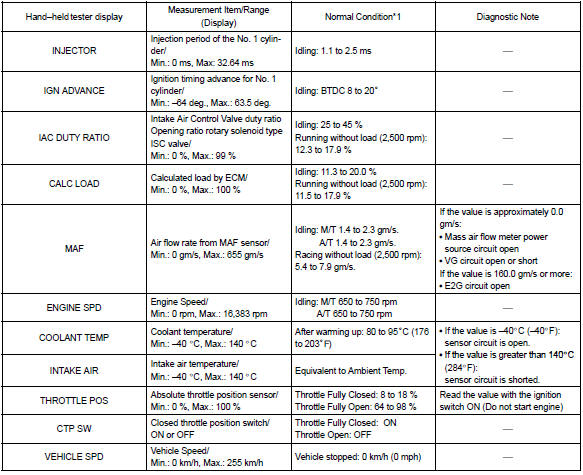
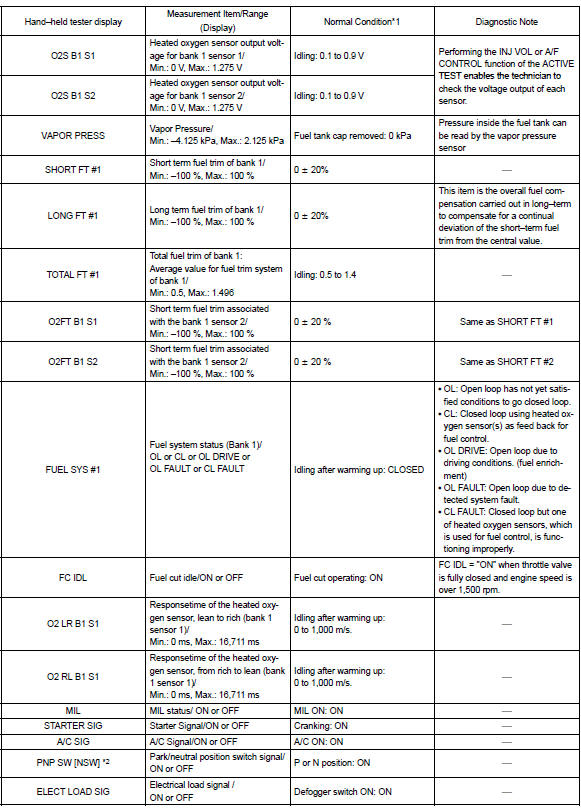
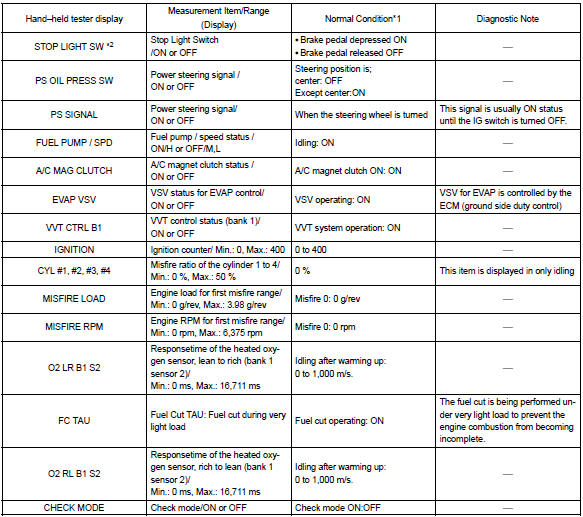
*1: If no conditions are specifically stated for ”ldling”, it means the shift lever is in the n or p position, the a/c switch is off and all accessory switches are off.
*2: A/t only
2. Active test
Hint
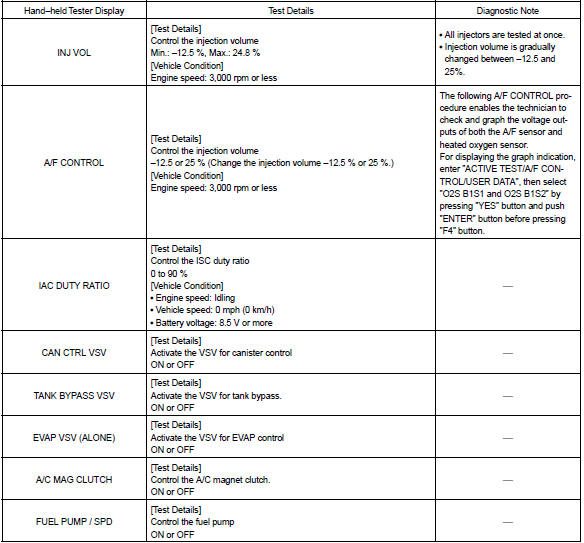
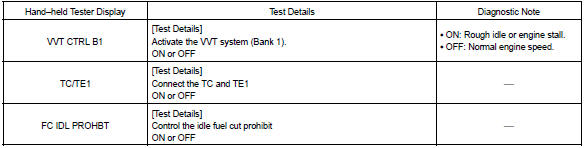
: performing the active test using the hand–held tester or the obd ii scan tool allows the relay, vsv, actuator and so on to operate without parts removal. Performing the active test as a first step of troubleshooting is one method to shorten diagnostic time.
It is possible to display the data list during the active test.
- warm up the engine.
- turn the ignition switch off.
- connect the hand–held tester or the obd ii scan tool to the dlc3.
- turn the ignition switch on.
- push the ”on” button of the hand–held tester or the obd ii scan tool.
- select the item ”diagnosis / enhanced obd ii / active test”.
- according to the display on the tester, perform the ”active test”.


Other materials:
Removal and installation of engine intake parts
If any metal tip is mixed in the inlet pass, this may give a
bad effect to the engine and turbocharger.
when removing and installing the inlet system parts,
close the opening of the removed inlet system parts and
the engine with a clean shop rag or gummed tape.
when inst ...
Toyota Safety Sense 3.0 software
update
It is necessary to enter a
connected services contract,
provided by Toyota, to
use these functions. For
details, contact your Toyota
dealer.
WARNING
■For safe use
When the Toyota Safety Sense
3.0 software is updated, the operating
methods of functions may
change. Using this system without
knowing ...
Inspection procedure
Hint:
hand–held tester only:
narrowing down the trouble area is possible by performing ”a/f control” active
test (heated oxygen
sensor or other trouble areas can be distinguished). Perform active test using
hand–held tester (a/f
control).
Perform active test using the hand–held ...