
Toyota Corolla (E170): Control panel
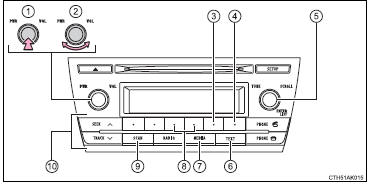
1 Power
2 Volume
3 Repeat play
4 Random playback
5 Select a file or display folder list
6 Displays text message
7 Playback
8 Select a folder, fast-forward or reverse
9 Search playback
10 Select a file


Other materials:
Circuit description
The rear heated oxygen sensor is used to monitor oxygen concentration in the
exhaust gas. For optimum
catalytic converter operation, the air fuel mixture must be maintained near the
ideal ”stoichiometric” ratio.
The heated oxygen sensor output voltage changes suddenly in the vicinity of ...
License plate lamp assy
Replacement
1. Remove luggage compartment lock cylinder & key set
2. Remove luggage compartment door garnish outside
3. Remove license plate lamp assy
Pull the license plate light assy to the side of vehicle as
shown in the illustration and release the claw.
disconnect the c ...
Warning buzzer does not sound (key reminder
warning, light reminder warning)
Wiring diagram
Inspection procedere
1 Check buzzer
Check that all of the warning buzzers sound.
2 Inspect front door courtesy lamp switch assy
3 Inspect un–lock warning switch assy
4 Check harness and connector(between un–lock warning switch
and combination meter as ...