
Toyota Corolla (E120) 2002–2008 Repair Manual / Diagnostics / ABS with EBD system / Open circuit in stop light switch
circuit / Circuit description
Toyota Corolla (E120): Circuit description

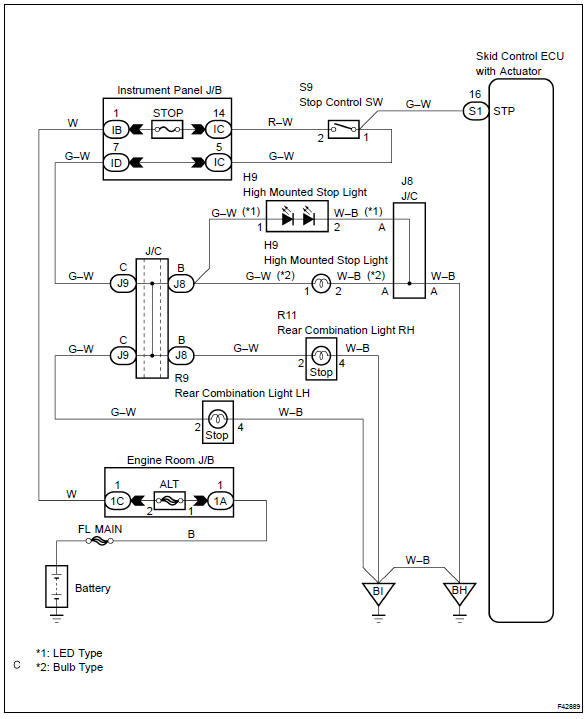
Wiring diagram


Other materials:
Inspection procedure
1 Check p squib circuit(airbag sensor assy center – instrument
panel passenger airbag assy)
Disconnect the negative (–) terminal cable from the battery,
and wait at least for 90 seconds.
disconnect the connectors between the airbag sensor
assy center and the instrument panel ...
Moon roof
Use the overhead switches to open and close the moon roof and tilt it up and
down.
■ Opening and closing
1 Opens the moon roof* The moon roof stops slightly before the fully open position
to reduce wind noise.
Press the switch again to fully open the moon roof.
2 Closes the moon roof*
...
Taking out the spare tire
1 Remove the luggage floor cover.
2 Remove the tool tray.
3 Loosen the center fastener that secures the spare tire.
CAUTION
■When storing the spare tire
Be careful not to catch fingers or other body parts between the spare tire and
the body of the vehicle. ...