
Toyota Corolla (E120) 2002–2008 Repair Manual / Diagnostics / Sfi system / Camshaft position sensor ”a”
circuit / Circuit description
Toyota Corolla (E120): Circuit description
The camshaft position sensor (g22+ signal) consists of a magnet, iron core and pickup coil.
The g22+ signal plate has 3 teeth on its outer circumference and is installed on the camshaft timing pulley.
When the camshafts rotate, the protrusion on the signal plate and the air gap on the pickup coil changes, causing fluctuations in the magnetic field and generating an electromotive force in the pickup coil.
The ne+ signal plate (crankshaft timing pulley) has 34 teeth and is installed to the crankshaft. The ne+ signal sensor generates 34 signals at every engine revolution. The ecm detects the crankshaft angle and the engine revolution based on the ne+ signals, and the cylinder and the angle of the vvt based on the combination of the g22+ and ne+ signals.
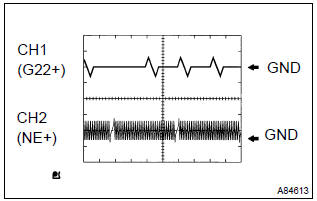
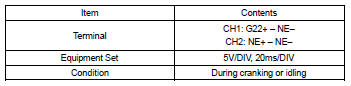
Reference: inspection using the oscilloscope.
Hint
: the correct waveform is as shown on the left.
Monitor description
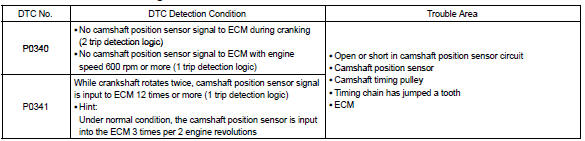
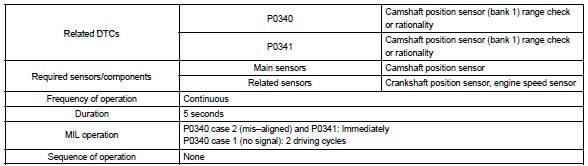
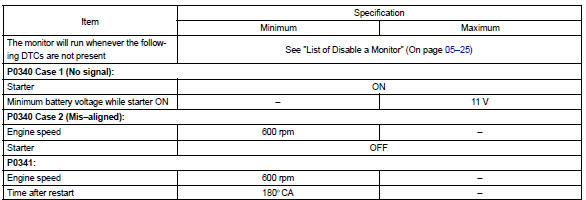
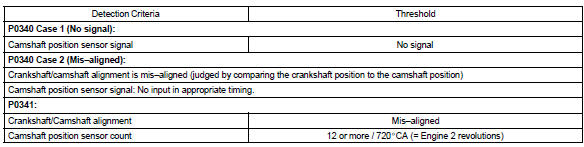
If there is no signal from the camshaft position sensor despite the engine revolving, or if the rotation of the camshaft and the crankshaft is not synchronized, the ecm interprets this as a malfunction of the sensor.
Monitor strategy
Typical enabling conditions
Typical malfunction thresholds
Component operating range

Wiring diagram
Refer to dtc p0335


Other materials:
Back up lamp assy lh
Replacement
1. Remove back up lamp assy lh
Remove the service hole cover.
remove the 2 nuts and disconnect the connector.
Using a mouldingremover, remove the 2 clips and back
up light assy lh.
2. Install back up lamp assy lh
Set the 2 clips on the back up ligh ...
Precaution
1. Handling precautions on steering system
care must be taken when replacing parts. Incorrect replacement may
affect the performance of the
steering system and result in a driving hazard.
2. Handling precautions on srs airbag system
the vehicle is equipped with srs (suppl ...
Connecting a Bluetooth® audio player
► Registering an additional device
Select “Select Device” on the Bluetooth® audio control screen.
►Selecting a registered device
Select “Select Device” on the Bluetooth® audio control screen.
■Reconnecting a Bluetooth® phone
If the system cannot connect due to poor ...