
Toyota Corolla (E120) 2002–2008 Repair Manual / Diagnostics / Sfi system / Crankshaft position sensor ”a”
circuit / Circuit description
Toyota Corolla (E120): Circuit description
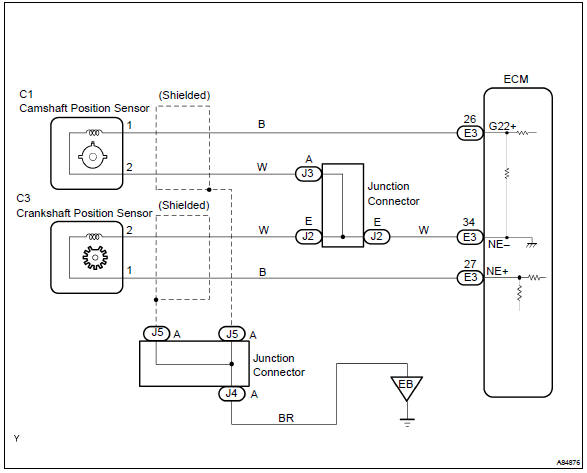
The crankshaft position sensor (ne signal) consists of a magnet, iron core and pickup coil.
The ne signal plate (crankshaft position sensor plate) has 34 teeth and is installed on the crankshaft. The ne signal sensor generates 34 signals for each engine revolution. This sensor monitors a plate (timing rotor) located on the crankshaft timing pulley and is used by the ecm to detect crankshaft angle and engine speed (rpm/ne). As the crankshaft timing pulley rotates through an engine revolution, this sensor communicates the rotation of the ne signal plate as a pulse signal to the ecm. Based on the signal, the ecm controls fuel injection time and ignition timing.
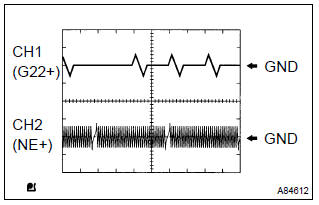
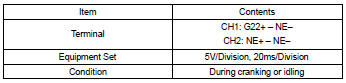
Reference: inspection using the oscilloscope.
Hint
: the correct waveform is as shown on the left.
Monitor description
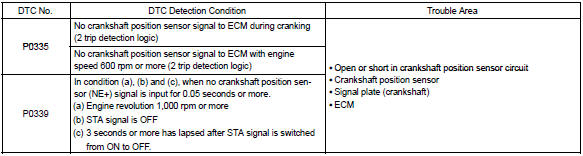
If there is no signal from the crankshaft sensor despite the engine revolving, the ecm interprets this as a malfunction of the sensor.
Monitor strategy
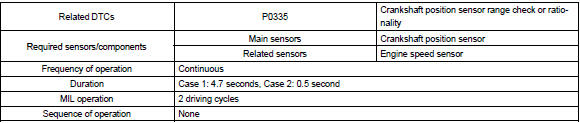
Typical enabling conditions
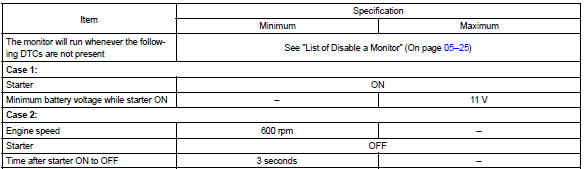
Typical malfunction thresholds

Wiring diagram


Other materials:
Adjustment
Hint:
in the rh side, work in the same procedure as in the lh side.
Since the centering bolt is used as a door side hinge bolt,
the door hinge cannot be adjusted with it on. Substitute
the bolt with washer for the centering bolt.
1. Inspect rear door panel sub–assy lh
Check ...
Heater control & accessory assy
Replacement
1. Remove console panel upper
2. Remove instrument cluster finish panel
3. Remove heater control & accessory assy
Release the 2 fitting claws and pull out the heater control
& accessory assy.
Using a screwdriver, open the claw of the cable clamp and
dis ...
About this vehicle
1. Structural outline
2. Notice about vehicle condition when jacking up
vehicle
(a) notice for using jack and safety stand
(B) notice for using swing arm type lift
(C) notice for using plate type lift
3. Damage diagnosis
4. Components
(a) front bumper
(B) side mu ...