
Toyota Corolla (E120) 2002–2008 Repair Manual / Diagnostics / Sfi system / Oxygen sensor circuit no activity
detected / Circuit description
Toyota Corolla (E120): Circuit description
Refer to dtc p0130
|
Dtc no. |
Dtc detecting condition |
Trouble area |
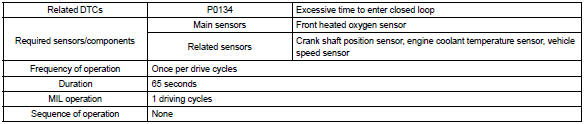
| P0134 | After engine is warmed up, heated oxygen sensor (bank 1
sensor 1) output does not indicate rich (greater than 0.45 V)
even once when conditions (a), (b), (c), (d) and (e) continue for
more than 65 seconds (1 trip detection logic) :
|
|
Hint
: after confirming dtc p0134, check the output voltage of the heated oxygen sensor (bank 1 sensor 1) in the ”diagnosis / enhanced obd ii / data list / all” using the hand-held tester or the obd ii scan tool.
If the output voltage of the heated oxygen sensor is always less than 0.1 V, the sensor circuit may be open or short.
Monitor description
The ecm uses the heated oxygen sensor to optimize the air–fuel mixture in the closed–loop fuel control.
This control helps decrease exhaust emissions by providing the catalyst with a nearly stoichiometric mixture.
The sensor detects the oxygen level in the exhaust gas and the ecm uses this data to control the air–fuel ratio. The sensor output voltage ranges from 0 v to 1 v. If the signal voltage is less than 0.4 V, the air–fuel ratio is lean. If the signal voltage is more than 0.5 V, the air–fuel ratio is rich. If the sensor does not indicate rich even once despite the conditions for the closed–loop fuel control being met and a specified time period has passed, the ecm will conclude that the closed–loop fuel control is malfunctioning. The ecm will illuminate the mil and a dtc is set.
Monitor strategy
Typical enabling condition
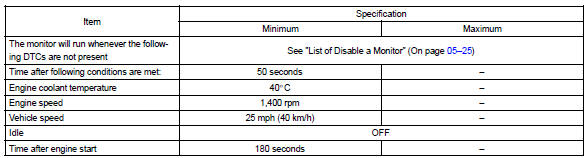
Typical malfunction thresholds

Component operating range

Wiring diagram
Refer to dtc p0130


Other materials:
Tire size
■ Typical tire size information
The illustration indicates typical tire size.
1 Tire use (P = Passenger car, T = Temporary use)
2 Section width (millimeters)
3 Aspect ratio (tire height to section width)
4 Tire construction code (R = Radial, D = Diagonal)
5 Wheel diameter (inches)
6 Loa ...
Stopping
► Automatic transmission or continuously
variable transmission
1 With the shift lever in D, depress the brake pedal.
2 If necessary, set the parking brake.
If the vehicle is to be stopped for an extended period of time, shift the shift
lever to P or N. (, 174, 176) ► Manual ...
Warning buzzer does not sound (key reminder
warning, light reminder warning)
Wiring diagram
Inspection procedere
1 Check buzzer
Check that all of the warning buzzers sound.
2 Inspect front door courtesy lamp switch assy
3 Inspect un–lock warning switch assy
4 Check harness and connector(between un–lock warning switch
and combination meter as ...