
Toyota Corolla (E120) 2002–2008 Repair Manual / Diagnostics / Sfi system / Camshaft position ”a” actuator
circuit / Circuit description
Toyota Corolla (E120): Circuit description
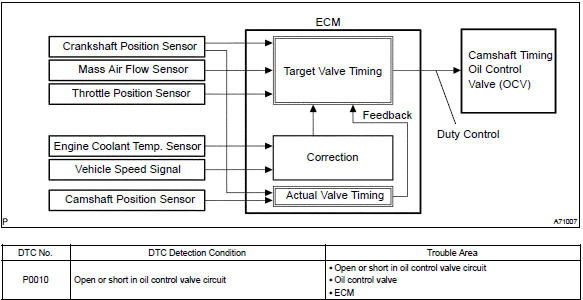
The variable valve timing (vvt) system includes the ecm, the oil control valve (ocv) and the vvt controller.
The ecm sends a target ”duty–cycle” control signal to the ocv. This control signal, applied to the ocv, regulates the oil pressure supplied to the vvt controller. Camshaft timing control is performed based on engine operation conditions such as the intake air volume, throttle position and engine coolant temperature.
The ecm controls the ocv, based on the signals output from the sensors. The vvt controller regulates the intake camshaft angle using oil pressure through the ocv. As result, the relative position between the camshaft and the crankshaft is optimized, and the engine torque improves, fuel economy improves, and exhaust emissions decrease under overall driving conditions. Also, the ecm detects the actual valve timing using signals from the camshaft position sensor and the crankshaft position sensor, and performs the feedback control. This is how target valve timing is verified by the ecm.
Monitor description
After the ecm sends the ”target” duty–cycle signal to the ocv, the ecm monitors the ocv current to establish an ”actual” duty–cycle. The ecm detects a malfunction and sets a dtc when the actual duty–cycle ratio varies from the target duty–cycle ratio.
Monitor strategy

Typical enabling conditions
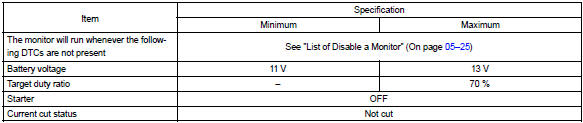
Typical malfunction thresholds

Component operating ra

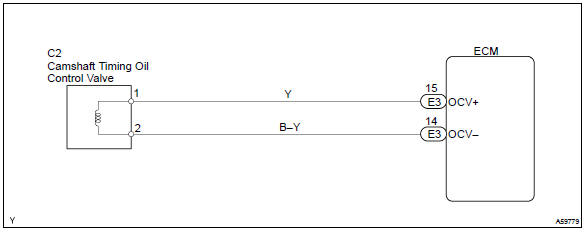
Wiring diagram


Other materials:
Air outlets
■ Location of air outlets
The air outlets and air volume changes according to the selected airflow mode.
: Some models
■ Adjusting the position of and opening and closing the air outlets
► Front center outlets
Direct air flow to the left or right, up or down.
► Fro ...
On–vehicle inspection
1. Inspect wireless door lock control functions
Hint:
the switch described in this text is a switch for transmitting
signals (lock switch, unlock switch
and panic switch) which is built into the door control transmitter.
All the functions listed below must be checked in the remote contro ...
Precaution
1. Handling precautions on steering system
care must be taken when replacing parts. Incorrect replacement may
affect the performance of the
steering system and result in a driving hazard.
2. Handling precautions on srs airbag system
the vehicle is equipped with srs (suppl ...