
Toyota Corolla (E170) 2014–2019 Owners Manual / Driving / Driving procedures / Engine (ignition) switch (vehicles with a smart key system) / Changing engine switch modes
Toyota Corolla (E170): Changing engine switch modes
Modes can be changed by pressing the engine switch with the brake pedal (continuously variable transmission) or clutch pedal (manual transmission) released. (The mode changes each time the switch is pressed.)
► Vehicles without a multi-information display Off*
The emergency flashers can be used.
The smart key system indicator light (green) is off.
ACCESSORY mode
Some electrical components such as the audio system can be used.
The smart key system indicator light (green) flashes slowly.
IGNITION ON mode
All electrical components can be used.
The smart key system indicator light (green) flashes slowly.
*: Vehicles with a continuously variable transmission: If the shift lever is in a position other than P when turning off the engine, the engine switch will be turned to ACCESSORY mode, not to off.
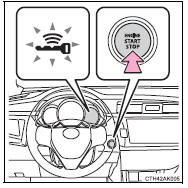
► Vehicles with a multi-information display Off*
The emergency flashers can be used.
The multi-information display will not be displayed.
ACCESSORY mode
Some electrical components such as the audio system can be used.
“POWER ON” will be displayed on the multi-information display.
IGNITION ON mode
All electrical components can be used.
“POWER ON” will be displayed on the multi-information display.
*: Vehicles with a continuously variable transmission: If the shift lever is in a position other than P when turning off the engine, the engine switch will be turned to ACCESSORY mode, not to off.
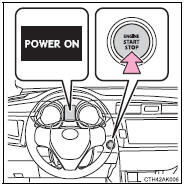


Other materials:
Emission inspection and maintenance (I/M) programs
Some states have vehicle
emission inspection programs
which include OBD
(On Board Diagnostics)
checks. The OBD system
monitors the operation of
the emission control system.
If the malfunction indicator
lamp comes on
The OBD system determines
that a problem exists somewhere
in the emission control
sy ...
Making a phone call
To enter the “PHONE” mode, press the off-hook switch.
■ Making a phone call
● Dialing by selecting a name
● Speed dialing
● Dialing by entering the number
● Dialing from call histories
■ Receiving a phone call
● Answering the phone
● Refusi ...
Circuit description
The door key lock and unlock switch is built in the door lock motor.
Wiring diagram
Inspection procedure
1 Check door lock
2 Check wire harness (tvip ecu door lock)
Disconnect the tvip ecu and door lock connectors.
check the continuity between the terminals of the t ...