
Toyota Corolla (E170) 2014–2019 Owners Manual / Interior features / Using the Multimedia system / Selecting the audio source / Changing audio source
Toyota Corolla (E170): Changing audio source
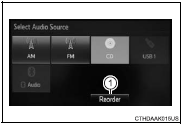
1 Press the “AUDIO” button to display the audio source selection screen.
If the audio source selection screen is not displayed, press the “AUDIO” button again.
2 Select the desired audio source.
1 Select the desired audio source then
 or
or
 to reorder.


Other materials:
How to proceed with troubleshooting
1 Vehicle brought to workshop
2 Customer problem analysis
3 Check and clear dtcs and freeze frame data
4 Problem symptom confirmation
Symptom does not occur: go to
step 5
Symptom occurs: go to step 6
5 Symptom simulation
6 Dtc check
There is no
output: go to step 7
There is outp ...
Precaution
1. Check that the battery cables are connected to the correct terminals.
2. Disconnect the battery cables when the battery is given a quick charge.
3. Do not perform tests with a high voltage insulation resistance tester.
4. Never disconnect the battery while the engine is running.
5. Check that ...
Steering wheel audio switches
Some audio features can be controlled using the switches on the steering wheel.
Operation may differ depending on the type of audio system or navigation system.
For details, refer to the manual provided with the audio system or navigation system.
Operating the audio system using the steering whe ...