
Toyota Corolla (E120): Basic inspection
When the malfunction is not confirmed in the dtc check, troubleshooting should be carried out in all the possible circuits considered as causes of the problem. In many cases, by carrying out the basic engine check shown in the following flowchart, the location causing the problem can be found quickly and efficiently. Therefore, using this check is essential in the engine troubleshooting.
1 Check battery voltage
Notice
: carry out this check with the engine stopped and ignition switch off.

Ng charge or replace battery

2 Check if engine will crank
Ng proceed to problem symptoms table on page
3 Check if engine starts
Ng go to step 7
4 Check air filter
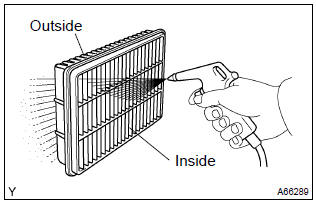
- Visually check that the air filter is not excessively dirty or oily.
Notice
: if necessary, clean the filter with compressed air. First blow from the inside thoroughly, then blow from the outside of the filter.
Ng clean or replace
5 Check idle speed
Ng proceed to problem symptoms table on page
6 Check ignition timing
Ng proceed to page 14–1 and continue to troubleshoot
Proceed to problem symptoms table on page
7 Check fuel pressure
Ng proceed to page 11–1 and continue to troubleshoot
8 Check for spark
Ng proceed to page 18–1 and continue to troubleshoot
Proceed to problem symptoms table on page


Other materials:
Power steering
Preparation
Sst
Recomended tools
Equipment
Lubricant
Ssm
...
Although system is powered,cd cannot be played
Wiring diagram
Inspection procedure
1 Check if a proper cd is inserted
Check that a proper cd is inserted.
Make sure that the cd is a normal audio cd, and that there is no
deformation, flaw, stain, burr
and other defects on the cd.
Standard: normal audio cd.
Reference:
...
Overhaul
1. Remove roof headlining assy
2. Remove sliding roof glass sub–assy
using a torx wrench (t25), remove the 4 screws the sliding roof
glass.
pull the glass upward to remove it.
3. Remove sliding roof weatherstrip
4. Remove sliding roof drive gear sub–assy
Notice:
...