
Toyota Corolla (E170) 2014–2019 Owners Manual / Interior features / Setup (Multimedia system) / Audio settings
Toyota Corolla (E170): Audio settings
Settings are available for adjusting the radio operation, cover art, etc.
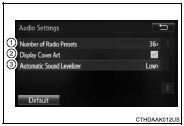
Screen for audio settings
1 Press the “SETUP” button.
2 Select “Audio” on the “Setup” screen.
1Number of Radio Presets Select the number of radio preset stations.
2 Display Cover Art on/off 3 Automatic Sound Levelizer


Other materials:
Inspection procedure
Hint:
hand–held tester only:
narrowing down the trouble area is possible by performing ”a/f control” active
test (heated oxygen
sensor or other trouble areas can be distinguished).
Perform active test using hand–held tester (a/f control).
Hint:
”a/f control” is the active te ...
Engine oil
With the engine at operating temperature and turned off, check the oil level
on the dipstick.
■ Checking the engine oil
1 Park the vehicle on level ground. After warming up the engine and turning it
off, wait more than 5 minutes for the oil to drain back into the bottom of the engine.
2 ...
Using the rear view monitor system
■ Screen description
1 Vehicle width guide lines
The line indicates a guide path when the vehicle is being backed straight up.
The displayed width is wider than the actual vehicle width.
2 Vehicle center guide lines
These lines indicate the estimated vehicle center on the ground.
3 Dis ...