
Toyota Corolla (E170) 2014–2019 Owners Manual / Interior features / Using the air conditioning system and defogger / Automatic air conditioning system / Air conditioning controls
Toyota Corolla (E170): Air conditioning controls
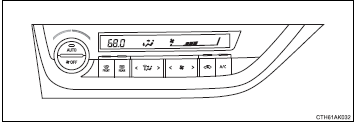
■ Adjusting the temperature setting
To adjust the temperature setting, turn
 clockwise to increase the temperature
and turn
clockwise to increase the temperature
and turn  counterclockwise to decrease
the temperature.
counterclockwise to decrease
the temperature.
■ Fan speed setting
Press “>” on  to increase the fan
speed.
to increase the fan
speed.
Press “<” on  to decrease the fan speed.
■ Change the airflow mode
To change the airflow, press “<” or “>” on
 .
.
The air outlets used are switched each time either side of the button is pressed.
■ Other functions
● Switching between outside air and recirculated air modes ● Defogging the windshield ● Defogging the rear window and outside rear view mirrors


Other materials:
Starting the engine
► Automatic transmission or continuously
variable transmission
1 Check that the parking brake is set.
2 Check that the shift lever is set in P.
3 Firmly depress the brake pedal.
4 Turn the engine switch to the “START” position and start the engine.
► Manual transmission
1 Che ...
Replacement
Hint: components:
1. Precaution
2. Disconnect battery negative terminal
3. Remove horn button assy
Place the front wheels facing straight ahead.
using a torx socket wrench (t30), loosen the 2 torx
screws until the groove along the screw circumference
catches on the screw ca ...
Odometer and trip meter
display
■ Changing the display
Press the display change button
until the desired item is displayed.
■ Display items
Odometer
Displays the total distance the vehicle
has been driven.
Trip meter A/Trip meter B
Displays the distance the vehicle
has been driven since the meter
was last reset. Trip ...