
Toyota Corolla (E120) 2002–2008 Repair Manual / Windshield/windowglass/mirror / Instrument panel/meter
Toyota Corolla (E120): Instrument panel/meter
Components
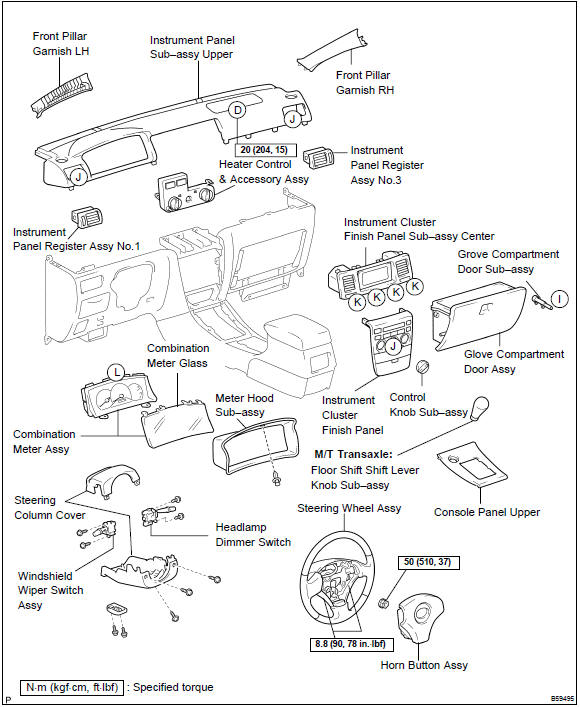
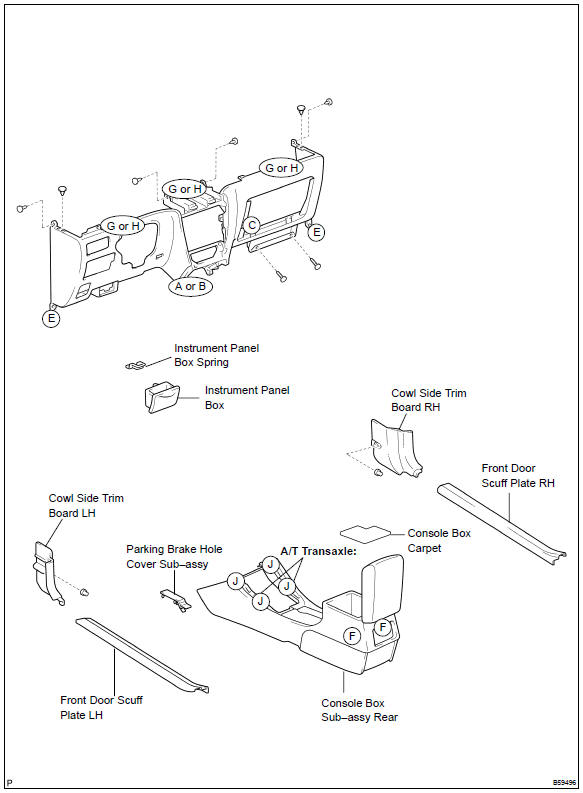


Other materials:
Checking the engine coolant
The coolant level is satisfactory
if it is between the "MAX" and
"MIN" lines on the reservoir
when the engine is cold.
Reservoir
"MAX" line
"MIN" line
If the level is on or below the "MIN"
line, add coolant up to the "MAX"
line.
■Coolant selection
Only use "Toyota Super Long Life
Coolant" or ...
System description
The ecm uses signals from the vehicle speed sensor and crankshaft position
sensor to detect the actual
gear position (1st, 2nd, 3rd or o/d gear).
Then the ecm compares the actual gear with the shift schedule in the ecm memory
to detect the mechanical
trouble of the shift solenoid valves, th ...
Inspection procedure
1 Inspect cruise control actuator assy
Inspect the cruise control actuator arm locking operation.
Turn the ignition switch to off.
Disconnect the cruise control actuator assy connector.
Connect the positive (+) lead from the battery to the
terminal 3 (l) of crui ...