
Toyota Corolla (E120): Inspection
1. Inspect sliding roof limit switch
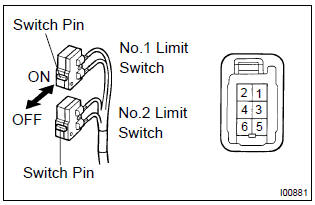
- Inspect the sliding roof limit switch continuity.
Standard:
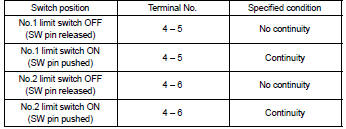
If the continuity is not as specified, replace the switch.
2. Inspect sliding roof drive gear sub–assy
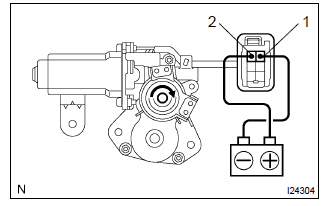
- Connect the positive (+) lead from the battery to terminal 2 and the negative (–) lead to terminal 1, and check that the motor turns clockwise (moves to the close side).
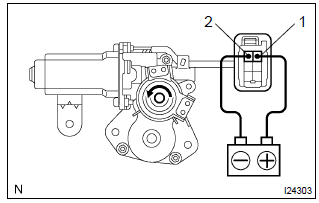
- Reverse the polarity, check that the motor turns counterclockwise (moves to the open side).
If the operation is not as specified, replace the motor.
3. Inspect sliding roof motor circuit breaker
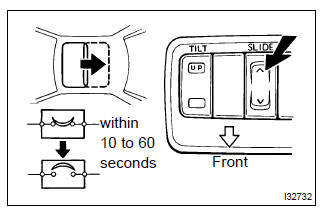
- With the sliding roof in the fully opened position, hold the sliding roof switch in the ”open” side and check that there is circuit breaker operating noise within 10 to 60 seconds.
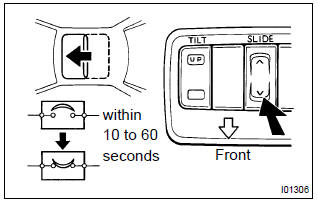
- With the sliding roof in the fully opened position, hold the sliding roof switch in the ”close” side and check that the sliding roof begins to close within 60 seconds.
If the operation is not as specified, replace the motor.
4. Inspect power main relay
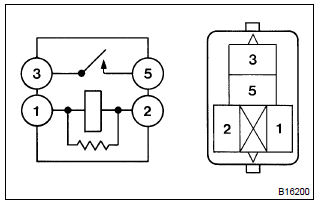
- Remove the power window relay from the instrument panel j/b.
- inspect the power window relay.
Standard:
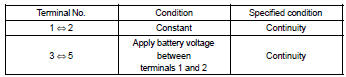
If the result is not as specified, replace the relay.


Other materials:
Diagnostic trouble code chart
Notice:
when removing the part, turn the ignition switch to off.
Hint:
using sst 09843–18040, it connect the terminal tc and cg of dlc3.
If any abnormality is not found when inspecting parts, inspect the ecu and
ground points for poor contact.
If a malfunction code is displayed during ...
Circuit description
When a misfire occurs in the engine, hydrocarbons (hc) enter the exhaust in
high concentrations. If this hc
concentration is high enough, there could be an increase in exhaust emissions
levels. High concentrations
of hc passing through the catalyst also cause to temperature of the catalyst to ...
Chassis
On–vehicle inspection
1. Inspect steering linkage
check the steering wheel freeplay .
check the steering linkage for looseness or damage.
Check that the tie rod ends do not have excessive play.
Check that the dust seals and boots are not damaged.
Chec ...