
Toyota Corolla (E120): Ignition
Service data
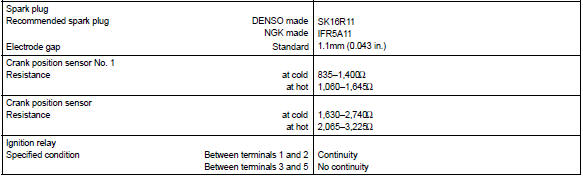
Torque specification



Other materials:
Manual transmission / transaxle
Service data
Torque specification
...
Deleting the contact data
For PBAP compatible Bluetooth® phones, this function is available when “Automatic
Contact/History Transfer” is set to off. 1 Select “Delete Contacts”.
2 Select the desired contact and select “Delete”.
3 Select “Yes” when the confirmation screen appears.
■ Deleting the con ...
Evap monitor (vacuum pressure monitor) (continued)
Preconditions
The monitor will not run unless:
mil is off.
Fuel level is approximately 1/2 to 3/4.
Altitude is 7800 feet (2400 m) or less.*
Engine coolant temperature (ect) is between 40°f and 95°f (4.4 °C and 35
°C).
Intake air temperature (iat) is between 40°f and 95 ...